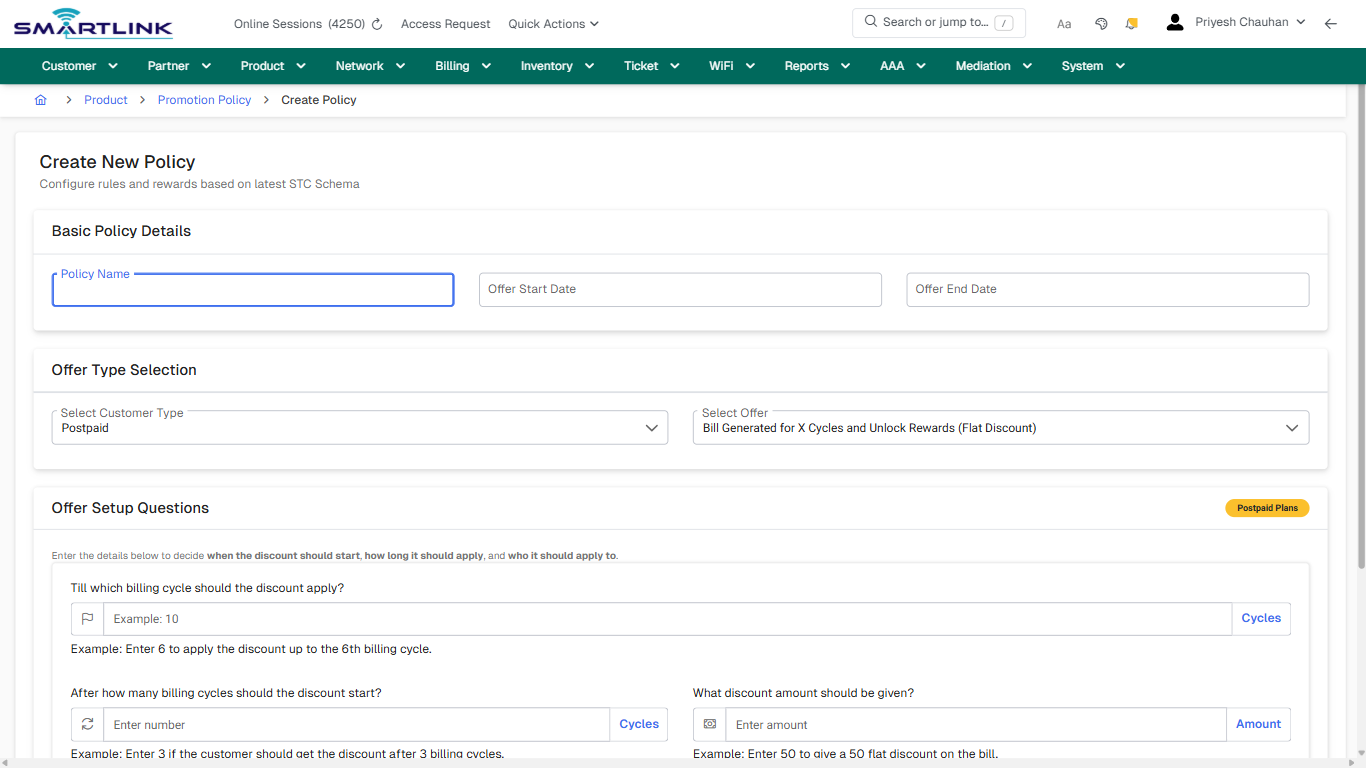
pro > promotion policy > add
pro > promotion policy > add
Route: pro/promotion-policy/add
URL: https://admin.myslbb.com/#/pro/promotion-policy/add
Overview
This page is a draft SOP reference for the above screen in i2i Core OSS/BSS. It is auto-generated from UI exports and should be reviewed for operational correctness before customer release.
When to Use
- Use this screen for the workflow represented by this route.
- Do not make billing/AAA/provisioning-impacting changes without required authorization.
Typical Workflow
- Verify you are working on the correct entity (Customer/Account/Service).
- Review the current lifecycle state before making changes.
- Apply changes and validate system response.
- Confirm downstream impact (AAA/Provisioning/Billing) where applicable.
Field & Action Hints (Auto-detected)
- Fields detected: Policy Name, Offer Start Date, Offer End Date, Select Customer Type, Select Offer, What discount amount should be given?, Which partners should this offer apply to?, Which plans should this offer apply to?
- Actions detected: Auto, Close, Product, Promotion Policy, Create Policy, Cancel
Validation & Safety Checks
- Confirm identifiers before saving.
- Confirm lifecycle state allows the change.
- Confirm rollback/support path exists for production actions.
Escalation Guidance
- L1: Verify input, permissions, and entity state.
- L2: Validate dependencies and downstream state.
- L3/Admin: Policy/config changes or suspected defect.
Screenshots
create_new
Captured URL: https://admin.myslbb.com/#/pro/promotion-policy/add
Images uploading…